
Module UI
A module shows up in the web UI in two ways:
- Its settings form, built from
Info.Settings. No code needed. - Its own pages, for everything a form can't do: statistics, a list to manage, a button that does something. This page is about those.
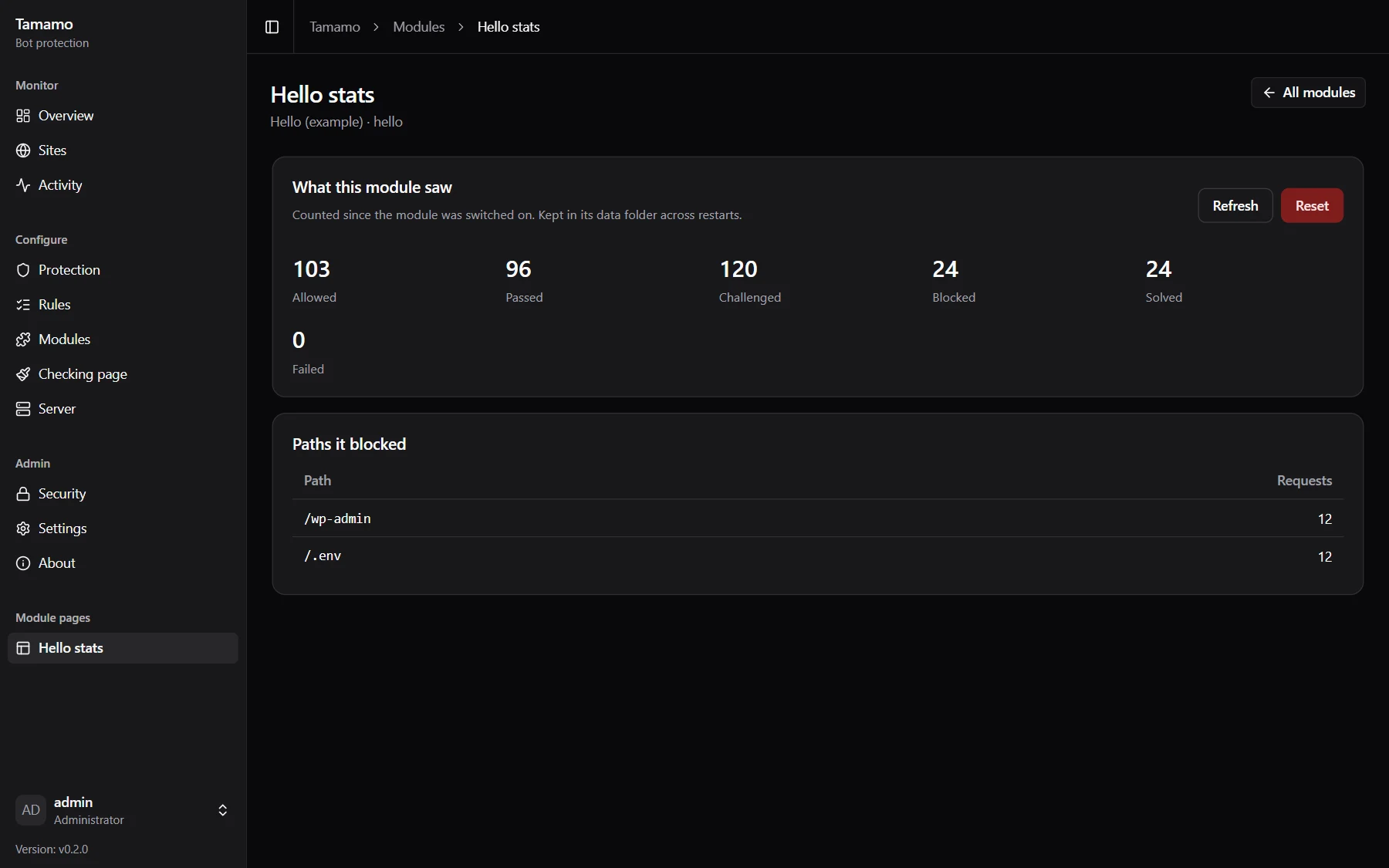
The picture shows the statistics page of the hello example module. The web UI adds everything around it: the entry under Module pages in the sidebar, the breadcrumb, and the All modules button. The module only wrote the part in the middle.
A module page is an HTML file you write and ship inside the binary. The web UI shows it in a frame, lists it in the sidebar under Module pages and on the module's card, and takes care of sign-in. The page gets its data from the module's own admin API.
text
  web UI (browser)                          Tamamo
  ----------------------------------        --------------------------------
  sidebar: Module pages > Stats
  +------------------------------+   GET   /assets/modules/ui/<id>/index.html
  | <iframe>  your index.html    | ------> Info.UI (files in the binary)
  |   tamamo.api('/stats') ------|-------> /api/x/<name>/stats -> ServeAdmin
  |   tamamo.toast('Saved')      |
  +------------------------------+
1. Ship the files
Put the page's files in a folder and embed them:
text
tamamo-geo/
  geo.go
  ui/
    index.html
    app.js
go
//go:embed ui
var files embed.FS

func init() {
	ui, _ := fs.Sub(files, "ui")
	module.Register(module.Info{
		ID:    "geo",
		Name:  "Country filter",
		Pages: []module.Page{{ID: "stats", Title: "Countries"}},
		UI:    ui,
		New:   newGeo,
	})
}
Page field | What it is |
|---|---|
ID | Part of the page's address in the web UI: a-z, 0-9 and dashes. |
Title | Shown in the sidebar, the breadcrumb and as the page's heading. |
Path | The HTML file in Info.UI. Defaults to index.html. |
A module can have several pages; each gets its own sidebar entry. Pages appear while an entry of the module is switched on and saved. With two entries, each has its own set.
2. Write the page
html
<!doctype html>
<html lang="en">
<head>
  <meta charset="utf-8">
  <title>Countries</title>
  <link rel="stylesheet" href="/assets/modules/kit/tamamo.css">
  <script src="/assets/modules/kit/tamamo.js"></script>
  <script src="app.js" defer></script>
</head>
<body>
  <div class="tm-stack">
    <div class="tm-card">
      <div class="tm-row">
        <h2>Blocked by country</h2>
        <span class="tm-spacer"></span>
        <button id="reload" class="tm-outline" type="button">Reload list</button>
      </div>
      <table>
        <thead><tr><th>Country</th><th class="tm-num">Requests</th></tr></thead>
        <tbody id="rows"></tbody>
      </table>
    </div>
  </div>
</body>
</html>
js
function load() {
  tamamo.api('/stats').then(function (stats) {
    var rows = document.getElementById('rows');
    rows.replaceChildren();
    stats.countries.forEach(function (c) {
      var tr = document.createElement('tr');
      var name = document.createElement('td');
      var count = document.createElement('td');
      name.textContent = c.code;
      count.textContent = c.count;
      count.className = 'tm-num';
      tr.append(name, count);
      rows.append(tr);
    });
  }).catch(function (err) { tamamo.toast(err.message, 'error'); });
}

document.getElementById('reload').addEventListener('click', function () {
  tamamo.api('/reload', { method: 'POST' })
    .then(function () { tamamo.toast('List reloaded', 'success'); load(); })
    .catch(function (err) { tamamo.toast(err.message, 'error'); });
});

load();
Relative URLs (app.js, img/logo.svg) resolve inside Info.UI. The two /assets/modules/kit/ files are the UI kit, served by Tamamo.
3. Answer from the module
tamamo.api('/stats') calls GET /api/x/<name>/stats, which Tamamo hands to the instance's ServeAdmin as /stats. See AdminHandler for the Go side.
The hello example's /stats answers with JSON of this shape. events counts each event kind, and blocked counts requests per blocked path:
json
{
  "events": { "allow": 120, "challenge": 35, "block": 4 },
  "blocked": [ { "path": "/wp-admin", "count": 4 } ]
}
The UI kit
The kit is optional, but it does the two things every page needs: it talks to the module's API with the right headers, and it makes the page look like the web UI around it.
tamamo.js
Loading the script defines window.tamamo:
| Member | What it does |
|---|---|
tamamo.module | The entry's name from tamamo.yaml. |
tamamo.lang | The web UI's language: en, ru, uk... Use it to translate the page. |
tamamo.apiBase | /api/x/<name>, for building URLs by hand (a download link, an EventSource). |
tamamo.api(path, options) | Calls the module's admin API. Returns a promise of the parsed JSON. |
tamamo.toast(message, kind) | Shows a notification in the web UI. kind is info (default), success or error. |
tamamo.navigate(path) | Opens another screen of the web UI, such as /modules or /activity. |
tamamo.api in detail:
js
tamamo.api('/stats')                                   // GET
tamamo.api('/rules', { body: { country: 'KP' } })      // POST with a JSON body
tamamo.api('/rules/KP', { method: 'DELETE' })
tamamo.api('/import', { body: formData }) // FormData and Blob are sent as they are- It adds the
X-Tamamo-Requestheader that Tamamo requires for anything butGET. - A non-2xx answer rejects the promise with an
Errorwhosemessageis theerrorfield of the JSON answer, pluserr.statusanderr.data. - On
401it tells the web UI, which shows the sign-in screen.
path is added to tamamo.apiBase, so '/stats' calls /api/x/<name>/stats. The options object can have these keys:
method: the HTTP method. Without it, the call isGETwhen there is no body andPOSTwhen there is one.body: an object is sent as JSON. A string,FormData,BloborArrayBufferis sent as it is.headers: extra request headers.signal: anAbortSignalthat cancels the request.
The script also reports the page's height to the web UI, so the frame grows and shrinks with the content and the page never needs its own scrollbar.
tamamo.css
The stylesheet gives plain HTML the web UI's dark look: body, headings, links, button, input, select, textarea, table, code and pre are styled without classes. On top of that:
| Class | Use |
|---|---|
tm-card | A bordered panel. The basic building block. |
tm-stack | Stacks its children with even gaps. |
tm-row | A horizontal row that wraps; tm-spacer pushes what follows to the right. |
tm-grid | A responsive grid of equal columns. |
tm-stat | A big number with a caption: <div class="tm-stat"><b>42</b><span>Blocked</span></div>. |
tm-badge | A small label; add tm-ok, tm-warn or tm-bad for color. |
tm-alert | A notice box; add tm-bad for errors. |
tm-empty | Centered placeholder text for empty lists. |
tm-muted, tm-small, tm-mono | Text helpers. |
tm-num | Right-aligned numbers in table cells. |
tm-secondary, tm-outline, tm-danger | Button variants. The plain button is the primary one. |
Colors are CSS variables (--primary, --card, --border, --muted-foreground, --success, --danger...) that you can use in your own styles. The page background is transparent, so the web UI shows through.
Rules for pages
- No inline scripts. The page is served with a content security policy that only runs scripts from files: no
<script>with code inside, noonclick="..."attributes. Put code in.jsfiles and useaddEventListener. Inline styles are allowed. - Same origin only. Scripts, styles, images and requests must come from Tamamo itself: your
Info.UIfiles, the kit and the admin API. A page can't load a library from a CDN; ship it inui/instead. To reach an outside service, call it from Go inServeAdmin. - Admins only.
Info.UIfiles and the admin API are only served to a signed-in admin. Still, don't embed secrets in the files: they are part of the binary. - A page has admin power. It runs in the web UI's origin with the admin's session, so it could call any admin API. That is the same trust you already place in the module's Go code; keep third-party JavaScript out of it.
- Insert text safely. Use
textContent, notinnerHTML, for anything that comes from requests, such as paths and user agents. Visitors control those strings. - Keep working when opened directly. The kit's
toastandnavigatedo nothing outside the web UI's frame, which is handy when you open the page on its own while developing.
Translating a page
The web UI is available in several languages. A page can follow along by reading tamamo.lang:
js
var texts = {
  en: { title: 'Blocked by country', reload: 'Reload list' },
  uk: { title: 'Заблоковано за країною', reload: 'Оновити список' },
};
var t = texts[tamamo.lang] || texts.en;
document.querySelector('h2').textContent = t.title;
The page's Title in the sidebar and the field labels of the settings form come from Go and are not translated.
Developing a page
Rebuilding the binary for every change to a page is slow. While developing, serve the files from disk instead of from embed. The embedded in the code below is the ui folder of your files. Declare it first:
go
//go:embed ui
var files embed.FS

var embedded, _ = fs.Sub(files, "ui")
Then the development code:
go
var ui fs.FS = embedded
if dir := os.Getenv("GEO_UI_DIR"); dir != "" {
	ui = os.DirFS(dir) // edit, then reload the page
}
Pages are served with Cache-Control: no-cache, so a reload always shows the current files.
Addresses
| What | Address | Who can load it |
|---|---|---|
| A page in the web UI | #/modules/<name>/<page id> | Signed-in admin |
Files of Info.UI | /assets/modules/ui/<module id>/<file> | Signed-in admin |
| The UI kit | /assets/modules/kit/tamamo.css, tamamo.js | Anyone who can reach the web UI |
| The module's admin API | /api/x/<name>/... | Signed-in admin |
Files of Info.Static, in the page preview | /assets/modules/static/<module id>/<file> | Signed-in admin |
All of them are on the admin port, behind the web UI container. Note which ones use the module's ID (files, shared by all entries) and which the entry's name (pages and API, one per entry).
Related
- Hooks: AdminHandler: the Go side of a page.
- Settings: often a form is all a module needs.
examples/hello: a complete module with a page.