
Module settings
A module describes its settings once, in Info.Settings. From that list:
- the web UI builds the settings form on the module's card;
- Tamamo checks values when a config is saved, in the web UI or in
tamamo.yaml; tamamo -modulesprints them as documentation.
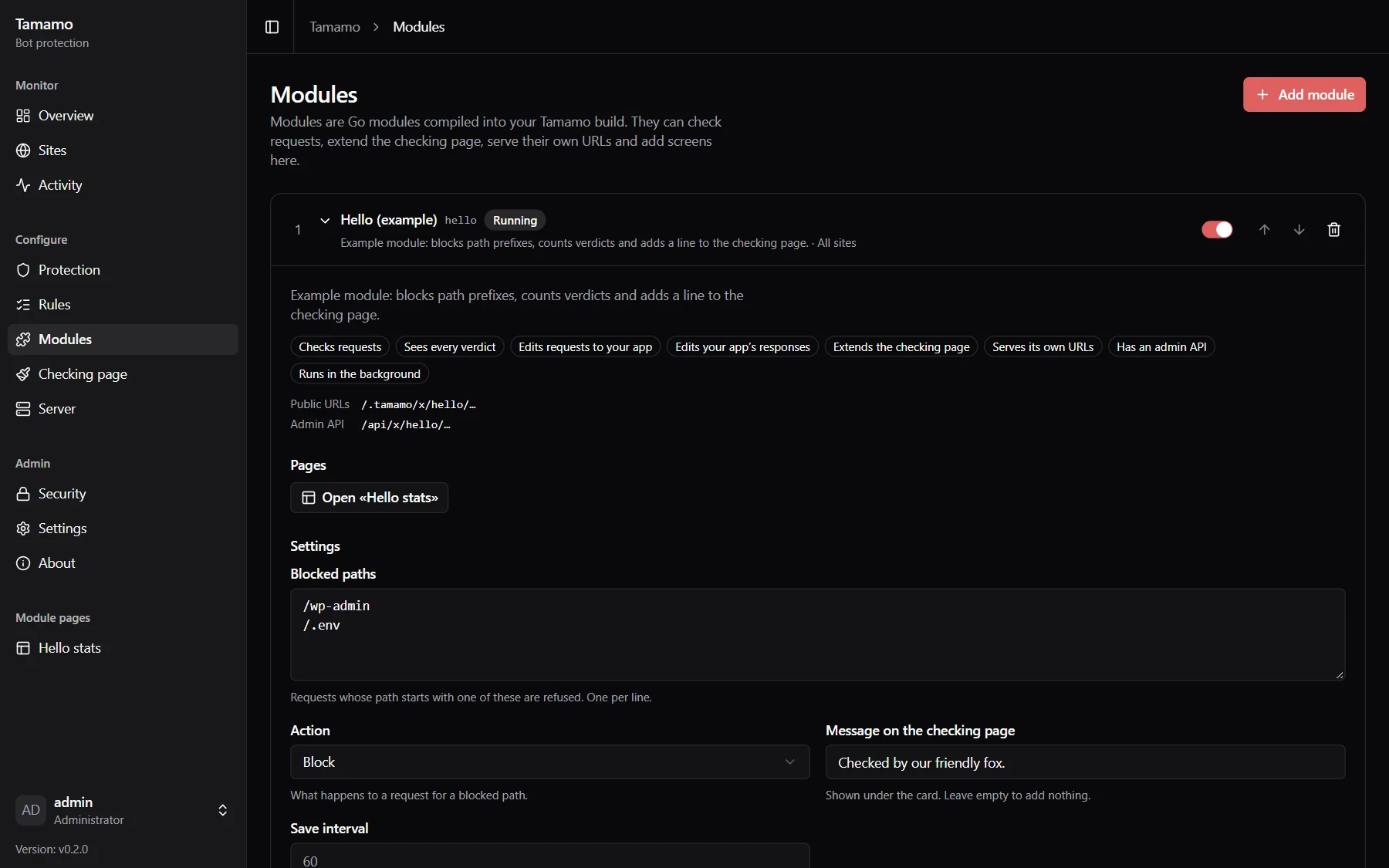
The picture shows the form the web UI builds for the hello example module. Each field comes from one entry in Info.Settings: Blocked paths is a List, Action is a Select, Message is a Text and Save interval is a Number.
Declaring fields
The examples on this page are fragments. Call module.Register from an init function, as the hello example does. The code below shows only that call.
go
module.Register(module.Info{
	ID: "geo",
	Settings: []module.Field{
		{
			Name: "countries", Label: "Countries", Type: module.List, Required: true,
			Description: "Two-letter country codes.", Placeholder: "KP",
		},
		{
			Name: "action", Label: "Action", Type: module.Select, Default: module.Block,
			Options: []module.Option{
				{Value: module.Block, Label: "Block"},
				{Value: module.Challenge, Label: "Challenge"},
			},
		},
		{Name: "license_key", Label: "License key", Type: module.Secret},
		{Name: "refresh_hours", Label: "Refresh every", Type: module.Number, Default: "24", Min: 1, Max: 720},
	},
	New: newGeo,
})
Field | What it is |
|---|---|
Name | The key in settings: in tamamo.yaml. Required and unique. Renaming it later loses the saved value. |
Label | The label in the form. Defaults to Name. |
Description | Help text under the control. Say what the setting does and what a value looks like. |
Type | One of the types below. Defaults to module.Text. |
Default | Used when the setting is empty. Must itself be a valid value. |
Placeholder | Example text shown in an empty control. |
Required | An empty value is refused when saving. |
Options | The choices of a Select. |
Min, Max | Bounds of a Number. Leave both at 0 for no bounds. |
Field types
| Type | Control in the web UI | Stored value | Checked |
|---|---|---|---|
module.Text | One-line input | The text | |
module.Secret | Password input with a show button | The text | |
module.Number | Number input | Digits, such as "24" | A whole number, within Min..Max if set |
module.Bool | Switch | "true" or "false" | true, false, 1, 0, yes, no, on, off |
module.Select | Dropdown | The option's Value | One of Options |
module.TextArea | Multi-line input | The text | |
module.List | Multi-line input, one entry per line | Lines of text |
Settings are always stored as text, because that is what tamamo.yaml holds:
yaml
modules:
  - name: geo
    enabled: true
    settings:
      countries: |
        KP
        XX
      action: challenge
      refresh_hours: "48"
A List can also be written on one line with commas: countries: "KP, XX".
Secrets are stored in plain text
module.Secret only hides the value on screen. It is saved to tamamo.yaml like every other setting and sent to the web UI of a signed-in admin. Say so in the description of a sensitive setting if it matters.
Reading values
ctx.Settings in New is a module.Settings, a map[string]string with helpers. Defaults are already filled in.
| Method | Returns |
|---|---|
String(key) | The value with surrounding space removed. |
Int(key, def) | A whole number, or def when empty or not a number. |
Bool(key) | true for true, 1, yes or on. |
Duration(key, def) | A time.Duration from "30s", "5m" or a bare number of seconds. |
List(key) | Entries split at line breaks and commas, trimmed, empty ones dropped. |
go
func newGeo(ctx *module.Context) (module.Module, error) {
	g := &geo{
		ctx:     ctx,
		action:  ctx.Settings.String("action"),
		refresh: time.Duration(ctx.Settings.Int("refresh_hours", 24)) * time.Hour,
		blocked: map[string]bool{},
	}
	for _, c := range ctx.Settings.List("countries") {
		if len(c) != 2 {
			return nil, fmt.Errorf("country %q must be a two-letter code", c)
		}
		g.blocked[strings.ToUpper(c)] = true
	}
	return g, nil
}
Validation
Checks happen in two steps when a config is saved:
- Tamamo checks each value against its field: required, number and range, boolean, one of the options. This needs no code from you.
Newruns with the settings. Whatever the field types can't express, check here and return an error.
Either way the save is refused, the admin sees the message with the module's name in front, and the running instance keeps its old settings. Because New runs for validation, it must be free of side effects: see Keep New cheap.
Settings the module doesn't declare are passed through untouched. The web UI shows them under Other settings as key and value pairs, so an older config with extra keys keeps working.
Changing settings between versions
Config files outlive module versions. When you change a module's settings:
- Adding a setting with a
Defaultis safe. - Renaming one orphans the saved value. Read the old key as a fallback for a few releases:
if v := ctx.Settings.String("old_name"); v != "" { ... }. - Narrowing what is accepted (a smaller range, a removed option) makes existing configs fail to load after the upgrade. Tamamo then keeps running with the previous settings and logs the error. Prefer accepting the old value and treating it as the nearest new one.
Related
- Write a module: settings in the tutorial.
- Modules: how admins set them.
- Module UI: when a form is not enough.