
Rules
Rules decide what happens to each request before the check. allow lets it through, challenge shows the checking page, and block refuses it. In the web UI, find them under Configure > Rules.
How a request is decided
The checks before the rules and the modules run first. Then the rules run from top to bottom, and the first enabled rule that matches decides. If none matches, the default action applies. An allow rule must sit above any rule that would otherwise catch its requests.
Fields
| Key | Web UI | What it does |
|---|---|---|
name | Name | A label for you and the activity log. |
enabled | The switch on the rule | false turns the rule off without deleting it. Default true. |
action | Action | allow, challenge (shown as Check), or block. deny is accepted as block. Required. |
difficulty | Difficulty override | 0 to 8. Used by challenge rules only. 0 uses protection.difficulty. |
paths | Paths | Request path, one pattern per line. |
user_agents | User agents | Patterns matched anywhere in the User-Agent header. |
ips | IP addresses or ranges | A single address or a CIDR range, such as 203.0.113.0/24. |
methods | Methods | HTTP methods such as GET or POST. Empty means any method. |
hosts | Hosts | The host name the visitor opened, without the port. |
headers | Headers | A header name and a pattern. See Headers. |
note | Note | For you only. It does not affect matching. |
Tamamo also accepts the aliases path_regex, user_agent_regex, headers_regex, and remote_addresses.
How matching works
A rule matches when every condition you write matches. Within one condition, any entry may match. A rule with no conditions matches every request.
Each example is one rule. It goes in the list under rules: in data/tamamo.yaml.
yaml
- name: Block scrapers on the shop
  action: block
  hosts: [shop.example.com]            # the host is shop.example.com
  methods: [GET, POST]                 # and the method is GET or POST
  user_agents: ["*scrapy*", "*wget*"]  # and the user agent contains scrapy or wget
Before matching, Tamamo decodes the path, collapses repeated slashes, resolves . and .., and drops the query string. So /private/../login?x=1 is checked as /login. A trailing slash is kept, so /login/ is not /login.
Patterns
*matches any run of characters, including/./api/*matches/api/users, and*GPTBot*matches any user agent containingGPTBot.re:at the start makes the rest a regular expression in Go's RE2 syntax, such asre:^/blog/[0-9]{4}/. A regular expression is never anchored, in any condition: it matches anywhere in the value.re:/loginalso matches/admin/login, so add^and$yourself to match the whole value.
Quote every pattern that starts with *. Unquoted, YAML reads * as an alias, and the file will not load.
How each condition matches, and whether case counts:
| Condition | A * pattern must | Case-sensitive |
|---|---|---|
paths | match the whole path | yes, including re: |
hosts | match the whole host name | no, including re: |
user_agents | match anywhere in the header | no, including re: |
headers | match anywhere in each value | no, including re: |
methods | match the whole method | no |
The table applies to * patterns only. re: patterns match anywhere in the value, as described above.
Only paths are case-sensitive. To make a path pattern ignore case, use re:(?i), such as re:(?i)^/admin.
Headers
Write headers as a map from header name to pattern:
yaml
headers:
  Accept-Language: "*de*"
The header must be present, and any value may match. An empty pattern or a single * only requires the header to exist.
Per-rule difficulty
A challenge rule can set its own difficulty. A pass earned at a lower level does not count. A visitor who passed at level 4 is asked again on a path that needs level 6.
The default rules
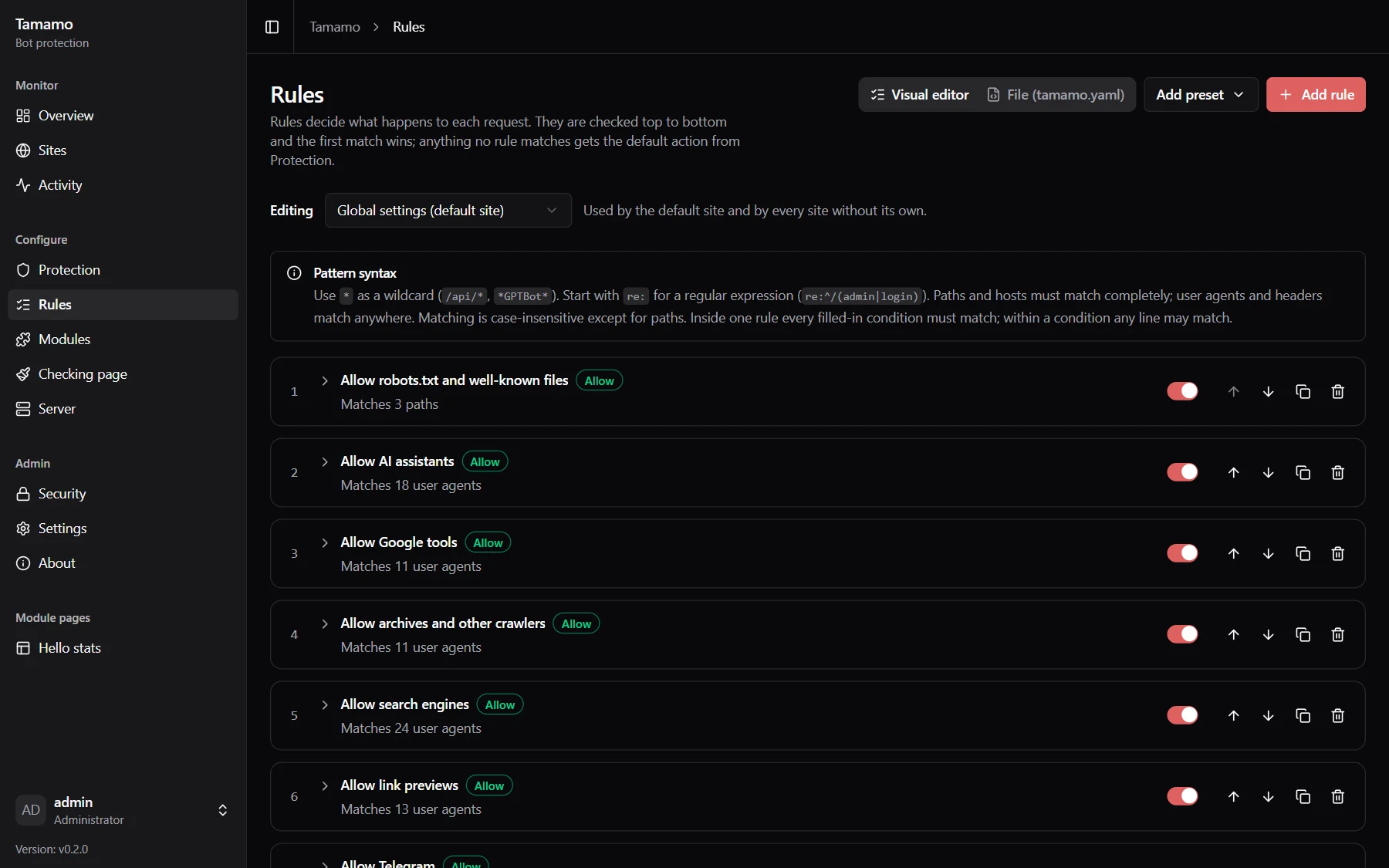
A new install starts with eight rules. They let search engines, AI assistants, link previews, and Telegram through without a check. The last rule, Check everyone else, matches every path, so the default action rarely applies.
| # | Name | Action | Matches |
|---|---|---|---|
| 1 | Allow robots.txt and well-known files | allow | /robots.txt, /.well-known/*, /favicon.ico |
| 2 | Allow AI assistants | allow | 18 user agents |
| 3 | Allow Google tools | allow | 11 user agents |
| 4 | Allow archives and other crawlers | allow | 11 user agents |
| 5 | Allow search engines | allow | 24 user agents |
| 6 | Allow link previews | allow | 13 user agents |
| 7 | Allow Telegram | allow | *telegrambot* |
| 8 | Check everyone else | challenge | every path (*) |
Rules 2 to 7 match the User-Agent header, which any client can set, so they let known bots through but do not prove identity.
Full user agent lists
Allow AI assistants: chatgpt-operator, chatgpt-user, chatgpt-user-2-0, claude-code, claude-searchbot, claude-user, claude-web, claudebot, duckassistbot, google-extended, oai-searchbot, perplexitybot, youbot, anthropic-ai, cohere-ai, amazonbot, amzn-user, gemini-deep-research
Allow Google tools: google-inspectiontool, googleother, googleother-image, googleother-video, googlebot-discovery, googlebot-image, googlebot-news, googlebot-video, storebot-google, chrome-lighthouse, google-page-speed-insights
Allow archives and other crawlers: archive-org-bot, ia-archiver, ia-archiver-web-archive-org, amazon-kendra, arquivo-web-crawler, bravest, crawl4ai, firecrawl, moodlebot, coccocbot-web, amzn-searchbot
Allow search engines: applebot, aspiegelbot, baiduspider, bingpreview, bingvideopreview, bingbot, duckduckbot, googlebot, microsoftpreview, mojeek, mojeekbot, petalbot, seznambot, seznamhomepagecrawler, slurp, teoma, yahoo-blogs, yahoo-feedseeker, yahoo-mmcrawler, yahooseeker, yandex, yandexadditional, yandexadditionalbot, yandexbot
Allow link previews: adidxbot, baidu, facebookbot, linkedinbot, meta-externalads, meta-externalagent, meta-externalfetcher, meta-webindexer, pinterestbot, quora-bot, slackbot, twitterbot, facebookexternalhit
Block AI scrapers (preset): GPTBot, ChatGPT-User, OAI-SearchBot, ClaudeBot, Claude-Web, anthropic-ai, CCBot, Bytespider, PerplexityBot, Perplexity-User, Amazonbot, Google-Extended, Applebot-Extended, meta-externalagent, FacebookBot, Diffbot, cohere-ai, ImagesiftBot, Omgilibot, Timpibot, YouBot, AI2Bot, Ai2Bot-Dolma, PetalBot, Scrapy, img2dataset, xAI, GrokBot
Each name matches anywhere in the User-Agent, ignoring case.
Change or restore the defaults
Edit a default rule on the Rules screen or in tamamo.yaml. Set enabled: false to switch one off and keep it.
To restore all eight, choose Restore default rules in the web UI. In tamamo.yaml, delete the whole rules: key and save; the file reloads within about 2 seconds. Do not write rules: [] instead. An empty list means no rules, so crawlers the defaults would let through get the check.
Presets
The Add preset menu adds ready-made rules. Most go to the top of the list. The eight default rules are in the menu too, so you can add back one you deleted.
| Preset | Action | What it does |
|---|---|---|
| Block AI scrapers | block | Refuses the AI crawlers listed in the details above. |
| Allow static files | allow | Stylesheets, scripts, images, and fonts load without a check. |
| Let non-browser clients through | allow | curl, wget, HTTP libraries, and feed readers. User agents are easy to fake. |
| Check every browser | challenge | Adds at the bottom. Any user agent claiming to be Mozilla or Opera is checked. |
| Block an IP range | block | Starts switched off. Add addresses or ranges, then turn it on. |
The rule tester and the rules file
The Rule tester, below the list, shows which rule would catch a sample request. It uses the saved rules, so save first if the screen warns you about unsaved changes.
Choose File (tamamo.yaml) at the top of the Rules screen to edit every rule as YAML, global and per site. A line with a problem blocks the save, and the error names the line. tamamo -check validates the same file from the command line.
Recipes
Add each recipe to the list under rules: in data/tamamo.yaml, at the place its text gives.
Block a scraper
Place it at the top, so it wins over any allow rule below.
yaml
- name: Block MegaScraper
  action: block
  user_agents: ["*MegaScraper*"]
Allow an API without a check
Place it above Check everyone else. API clients usually cannot run JavaScript, so they cannot pass the check. Keep the path narrow, because a bot can use it too.
yaml
- name: Allow the public API
  action: allow
  paths: ["/api/*"]
Let an uptime monitor through
Place it near the top. Behind a proxy, set ip_source first, and trusted_proxies, so the rule sees the monitor's real address.
yaml
- name: Allow uptime monitor
  action: allow
  ips: [203.0.113.10]
Harder check on logins
Place it above Check everyone else, or that rule matches first. Paths are case-sensitive, so add /Login too if your site uses it.
yaml
- name: Harder check for login
  action: challenge
  difficulty: 6
  paths: [/login, /login/*]
Rules for one site
A site with its own rules replaces the global list for that site. A site with rules: [] gets no rules at all.