
Webhooks
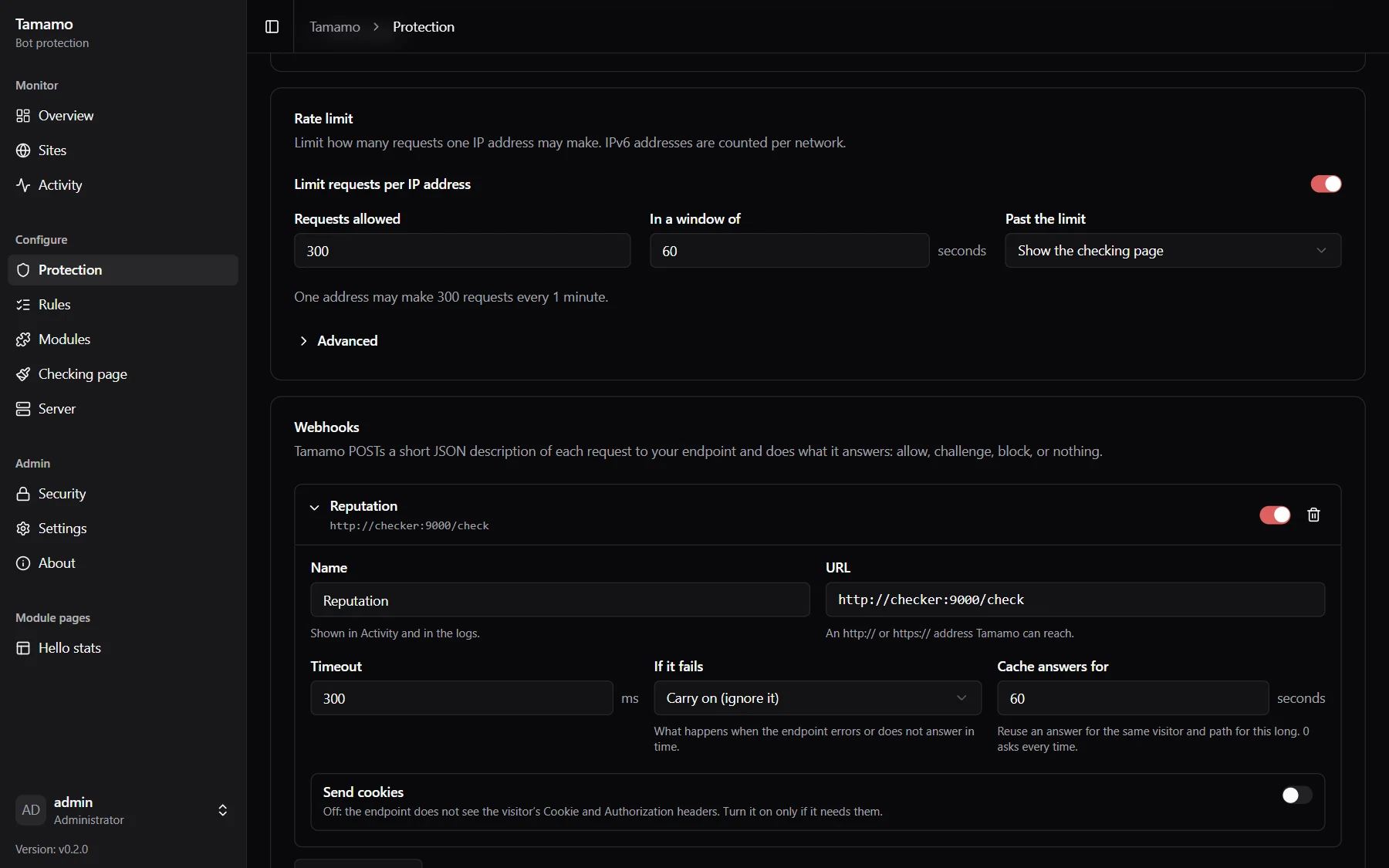
A webhook lets a service of yours decide about requests. For each request, Tamamo sends a POST with a JSON description to your URL and does what the answer says: allow, challenge, block, or nothing.
Webhooks are part of Protection. In the web UI, open Configure > Protection and scroll to Webhooks. In tamamo.yaml they are listed under protection.webhooks. A site with its own protection settings has its own list. That list replaces the global list for the site. It is not added to it.
When webhooks run
Webhooks run on every request, before the rules, after the bypass headers and the rate limit and before the modules. They run in the order listed. The first one that answers allow, challenge or block decides, and everything after it is skipped.
Settings
| Key | Web UI | Default | What it does |
|---|---|---|---|
name | Name | webhook-1, webhook-2... | Shown in Activity (as webhook:<name>) and in the logs. Unique within the list. |
enabled | The switch on the webhook's row | false | A switched-off webhook is kept but never called. A new webhook is off until you set enabled: true. |
url | URL | required | An http:// or https:// address, with no user name or password. |
timeout_ms | Timeout | 500 | How long Tamamo waits, 1 to 10000 ms. Visitors wait too, so keep it short. For a service on the same machine or network, try 200 to 500 ms. |
on_error | If it fails | continue | What to do when the call fails: continue ignores the webhook, challenge shows the checking page, block refuses the request. |
cache_seconds | Cache answers for | 0 | Reuses an answer for up to 3600 seconds. 0 asks every time. |
send_cookies | Send cookies | false | Passes the Cookie, Authorization and Proxy-Authorization headers to the webhook. They are left out by default, because they carry visitors' sessions. |
yaml
protection:
  webhooks:
    - name: Reputation
      enabled: true
      url: http://checker:9000/check
      timeout_ms: 300
      on_error: continue
      cache_seconds: 60
The request
Tamamo sends this body, with Content-Type: application/json and the user agent Tamamo-Webhook/1:
json
{
  "site": "shop",
  "method": "GET",
  "host": "shop.example.com",
  "path": "/cart",
  "query": "item=42",
  "user_agent": "Mozilla/5.0 (X11; Linux x86_64) ...",
  "ip": "203.0.113.7",
  "headers": {"Accept": "text/html", "Accept-Language": "en-US"}
}
site is the site's ID, or default. query is the raw query string without the ?. Repeated header values are joined with commas.
The answer
Reply with a 2xx status code and a JSON object:
json
{"action": "block", "difficulty": 0, "reason": "known scraper"}| Field | Values |
|---|---|
action | allow, challenge or block. continue, none or an empty string means no opinion. Any other value is an error. |
difficulty | 1 to 8, used for challenge only. 0 or any other number uses the site's default. |
reason | A short note for the logs. Longer reasons are cut to 200 bytes. |
A non-2xx status, a redirect, a timeout, a body that isn't JSON, or an unknown action counts as a failure, and on_error applies. Tamamo reads at most 64 KB of the answer.
Caching
The cache key is the site, IP address, user agent and path. The method, host and query string are not part of it, so a cached answer for GET /login also applies to POST /login. Turn caching on only for decisions that don't depend on those.
Example: block scanners
This service blocks requests for paths that only scanners ask for, and scanner user agents. Everything else gets no opinion. It uses only the Python standard library.
python
import json
from http.server import BaseHTTPRequestHandler, ThreadingHTTPServer

PROBES = ("/wp-login.php", "/wp-admin", "/.env", "/.git")
SCANNERS = ("sqlmap", "nikto", "masscan")


class Handler(BaseHTTPRequestHandler):
    def do_POST(self):
        req = json.loads(self.rfile.read(int(self.headers["Content-Length"])))
        path, agent = req["path"], req["user_agent"].lower()
        if path.startswith(PROBES):
            answer = {"action": "block", "reason": "probe for " + path}
        elif any(name in agent for name in SCANNERS):
            answer = {"action": "block", "reason": "scanner user agent"}
        else:
            answer = {"action": "continue"}
        body = json.dumps(answer).encode()
        self.send_response(200)
        self.send_header("Content-Type", "application/json")
        self.send_header("Content-Length", str(len(body)))
        self.end_headers()
        self.wfile.write(body)

    def log_message(self, *args):
        pass


ThreadingHTTPServer(("0.0.0.0", 9000), Handler).serve_forever()
Run it next to Tamamo. Add the probe-blocker service under the services: key in your compose file, docker-compose.yml. The services: line in the example is for context only. Do not add a second services: key.
yaml
services:
  probe-blocker:
    image: python:3.13-alpine
    restart: unless-stopped
    command: python /app/webhook.py
    volumes:
      - ./webhook:/app:ro
Then enable it in data/tamamo.yaml. The URL in the example is a placeholder. Replace it with the address of your own service.
yaml
protection:
  webhooks:
    - name: probe-blocker
      enabled: true
      url: http://probe-blocker:9000/
      timeout_ms: 300
      on_error: continue
      cache_seconds: 60
Request /.env through your site. It should be refused. If the service fails, docker compose logs tamamo shows a webhook failed warning with the reason.
Webhook or module?
A webhook is the quick way to add a check: any language, no rebuild, but one HTTP call per request. A module is Go code compiled into Tamamo: no network call, it can keep state in memory, and it can do much more than decide about requests. Start with a webhook, and move to a module when the call becomes the slow part.
Common problems
- Requests get slower. The webhook is too slow. Lower
timeout_msso failures come quickly, or raisecache_secondsif the decisions allow it. - Two webhooks are called ... Names must be unique within one protection section.
- The webhook is never called. Its switch is off, or a bypass header or the rate limit decided first. A site with its own protection settings uses its own list.
Related
- Protection: the bypass headers and the rate limit that run before webhooks.
- Modules: checks compiled into Tamamo.
- Rules: what runs after all of them.