
Checking page
The checking page is what visitors see while Tamamo checks their browser, when a rule blocks them, or when the check fails. Edit it in the Checking page screen of the web UI, or under page: in tamamo.yaml. Both write the same settings.
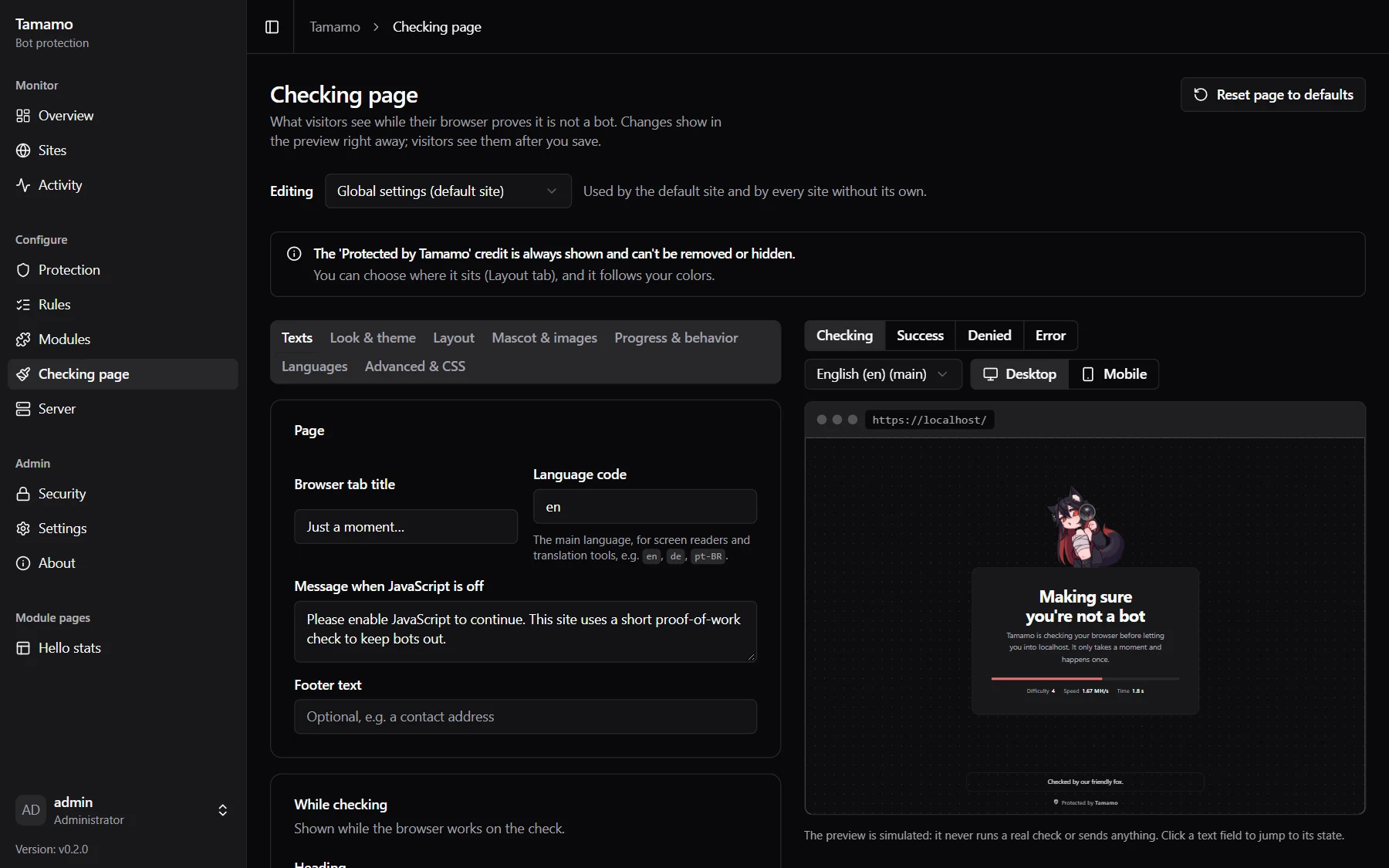
The designer
The tabs are Texts, Look & theme, Layout, Mascot & images, Progress & behavior, Languages and Advanced & CSS.
The preview is simulated and never runs a real check. Click Checking, Success, Denied or Error to see each state. Visitors see changes after you save.
Editing picks the global settings (used by the default site and by every site without its own page) or one site. Only the keys that differ need to be listed under a site. See Sites.
Reset page to defaults restores texts, colors, layout and custom CSS. Uploaded images stay.
Texts
{host} in any heading or message becomes the host name the visitor opened.
| Key | Web UI | Default | What it does |
|---|---|---|---|
title | Browser tab title | Just a moment… | Browser tab title, up to 200 characters. |
lang | Language code | en | Language of the main texts, for screen readers and translation tools. Invalid codes become en. |
texts.checking | While checking | Built in | Heading and message while the browser works on the puzzle. |
texts.success | Success | Built in | Shown after the check passes. |
texts.denied | Denied | Built in | Shown when a Block rule refuses the request. |
texts.error | Error | Built in | Shown when the check fails or the browser can't run it. |
retry_label | Retry button | Try again | Button on the error state. |
continue_label | Continue button | Continue | Button shown when auto_redirect is false. |
noscript | Message when JavaScript is off | Built in | Shown when JavaScript is disabled. |
footer_text | Footer text | empty | Small line at the bottom, such as a contact address. |
labels | Other wording | Built in | Stat names, units and problem messages. Each is up to 500 characters. |
Each state takes a heading and a message, such as texts.checking.heading.
Colors
| Key | Web UI | Default | What it does |
|---|---|---|---|
theme_mode | Color mode | dark | light, dark or auto. auto follows the visitor's device. Invalid values become auto. |
light | Palettes (Light) | Built in | Nine colors for light mode. |
dark | Palettes (Dark) | Built in | Nine colors for dark mode. |
Each palette takes background (page behind the card), surface (card), text, muted (secondary text), accent (progress bar and buttons), accent_text (text on the accent), border, success and danger (denied and error). Use #rgb, #rgba, #rrggbb or #rrggbbaa. List only the colors you change.
Quote the colors
In YAML, # starts a comment unless the value is quoted. Write accent: "#ff8a65".
Typography and layout
| Key | Web UI | Default | What it does |
|---|---|---|---|
font | Font | system | system, serif, rounded, mono or custom. |
custom_font | Custom font family | empty | Font family name, used when font is custom. Web fonts are not loaded, so the font must be installed on the visitor's device. |
font_scale | Text size | 100 | 70 to 150, in percent. |
heading_weight | Heading weight | 700 | 300 to 900. |
align | Text alignment | center | left or center. |
layout | Style | card | card puts content in a box, split puts the mascot beside it, minimal drops the box. |
card_width | Content width | 520 | 320 to 1100, in pixels. |
radius | Corner radius | 16 | 0 to 48, in pixels. |
card_border | Border around the card | true | Draws a border. |
card_shadow | Shadow under the card | false | Draws a shadow. |
credit_align | Position of the credit | center | left, center or right. |
custom_css | Custom CSS box | empty | Extra CSS for every state. See Custom CSS. |
The "Protected by Tamamo" credit (the small line at the bottom of the page) is always shown. You can move it with credit_align, but you can't remove or hide it.
Mascot and images
| Key | Web UI | Default | What it does |
|---|---|---|---|
mascot_show | Show the mascot | true | Shows the mascot picture. |
mascot_position | Position | top | top, bottom, left or right of the text. |
mascot_size | Size | 200 | 48 to 480, in pixels. |
mascot_animation | Animation | float | none, float, bounce or wiggle. Visitors who ask for reduced motion never see it move. |
mascot_mirror | Mirror horizontally | false | Flips the picture left to right. |
Upload images in the Mascot & images tab. Uploads take effect at once. Or put a file in the uploads folder of your data folder (data/uploads/ in the default Docker setup). The slots and their file names:
checking.*,success.*anddenied.*replace the mascot for each state.background.*is the background whenbackgroundisimage.favicon.*replaces the browser tab icon.
Files can be PNG, JPEG, GIF or WebP, up to 4 MB. If a name has several files, Tamamo serves the first one in the order .png, .jpg, .gif, .webp, so delete the old file when you change its extension.
Background
| Key | Web UI | Default | What it does |
|---|---|---|---|
background | Background | dots | solid, dots, grid, stripes or image. image uses uploads/background.*. Without that file, the plain background color shows. |
background_blur | Blur | 0 | 0 to 40, in pixels. Applies to a background image. |
background_dim | Dim | 40 | 0 to 90, in percent. Darkens a background image so text stays readable. |
Progress and timing
Keys ending in _ms are in milliseconds. 1000 ms is one second.
| Key | Web UI | Default | What it does |
|---|---|---|---|
progress | Progress indicator | bar | bar, ring, dots, spinner or none. |
show_difficulty | Show the difficulty | true | Shows the difficulty as a stat. |
show_hash_rate | Show the hash rate | true | Shows how fast the browser works. |
show_elapsed | Show elapsed time | true | Shows how long the check has run. |
show_percent | Show an estimated percentage | false | Shows an estimate. It can pass 100%, because proof of work has no real progress. |
min_display_ms | Show the page for at least | 800 | 0 to 15000. Keeps the page from flashing past on fast devices. |
success_delay_ms | Pause on success for | 900 | 0 to 15000. How long the success message stays. |
auto_redirect | Continue automatically | true | When false, visitors press the Continue button. |
animations | Animations | true | Turns animations off for everyone. |
Languages
language picks the language visitors see. auto uses the browser's language when a translation exists, and lang otherwise. Russian (ru) and Ukrainian (uk) are built in. Empty translation fields fall back to the main text. Set a language to off to remove it:
yaml
page:
  language: auto
  translations:
    ru: off                     # remove the built-in Russian
    de:
      title: Einen Moment…
      texts:
        checking:
          heading: Wir prüfen Ihren Browser
          message: Tamamo prüft Ihren Browser, bevor Sie {host} öffnen.
      retry_label: Erneut versuchen
Codes are lowercase, such as de or pt-br. In the web UI, use Add language on the Languages tab.
Custom CSS
Custom CSS is added after Tamamo's styles and applies to every state. It is limited to 64 KB, and it is refused if it contains a < or mentions tm-credit in any letter case. The page's elements have tm- class names, such as .tm-panel (the card) and .tm-bar (the progress bar). Overriding a variable on :root is the easiest change:
css
:root {
  --tm-accent: #3b82f6;
}