
Sites
Use sites when one Tamamo protects more than one website, or when one website needs its own protection, rules or checking page. A site is one of your websites. For each request, Tamamo picks the site by the host name the visitor typed, such as blog.example.com.
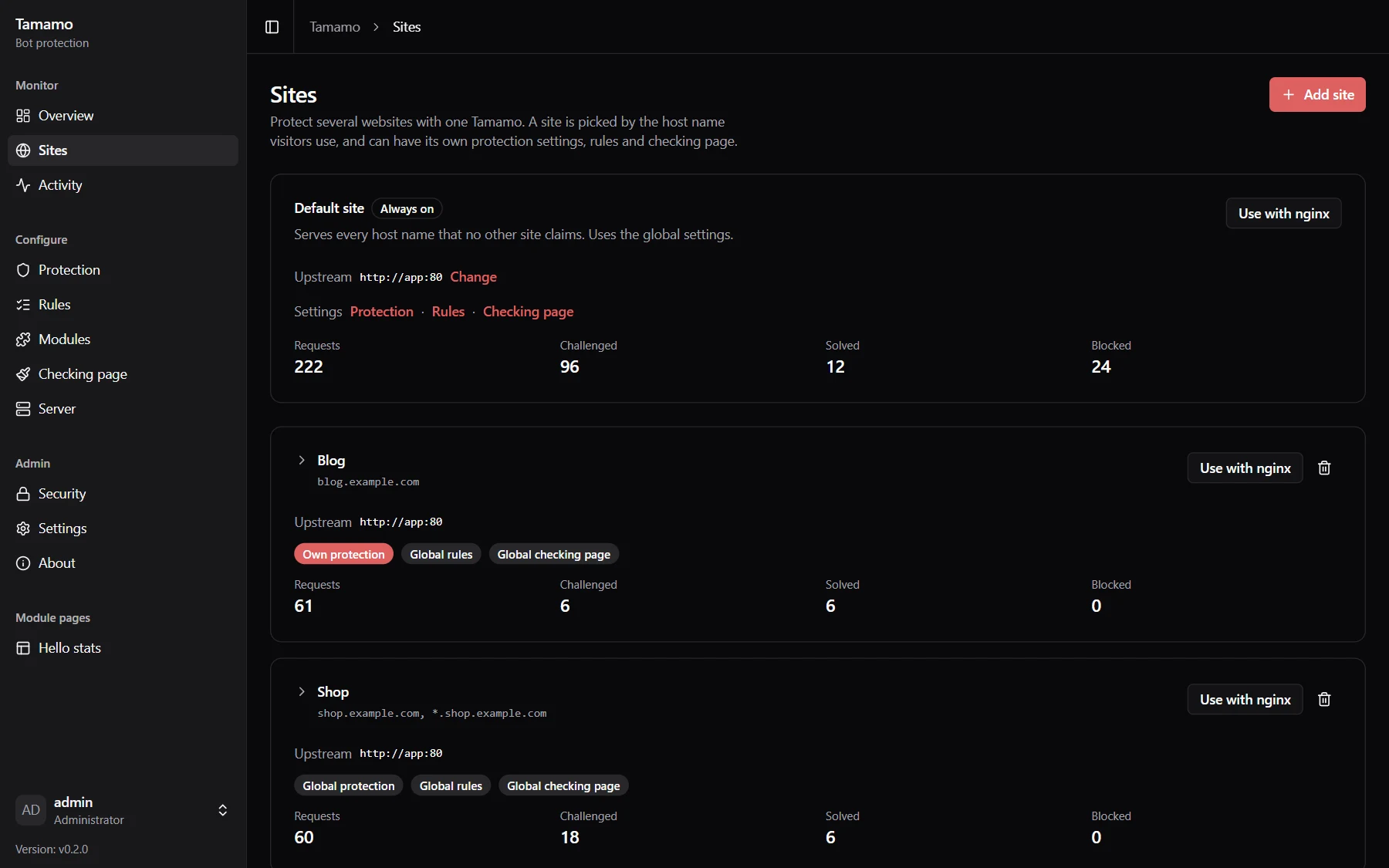
Sites live under the top-level sites: list. The Sites screen in the web UI edits the same list, with one card per site.
| Key | Web UI | What it does |
|---|---|---|
name | Name | The label in the web UI and in Activity. Names must be unique, ignoring case. The site ID is the name in lowercase with dashes, so My Blog becomes my-blog. |
hosts | Host names | The host names the site answers for. At least one. |
target | Upstream URL | The app for this site's visitors: http://, https:// or unix:///path. Empty uses server.target. |
protection | Use own protection settings | Only the protection keys that differ from the global settings. |
rules | Use own rules | Replaces the global rules for this site. rules: [] means no rules. |
page | Use own checking page | Only the checking-page keys that differ from the global settings. |
How a request picks a site
Tamamo drops the port and the letter case from the Host header, then compares the name with every site's hosts:
- An exact host name wins over a wildcard, even when the wildcard's site comes first in the file.
*.example.commatches any subdomain, at any depth, such aswww.example.comora.b.example.com. It does not matchexample.comitself.- A host that starts with
re:is a regular expression. It is not anchored, so add^and$to match the whole name. - A host entry with a port, such as
blog.example.com:8923, never matches, because the port is dropped from the request first. - Two sites can't list the same host name. Tamamo refuses to load the file.
Quote wildcards
YAML reads a bare * as an alias and rejects the line. Write "*.example.com" with quotes.
Requests for a host name that no site lists go to the default site. It uses the global settings and server.target, and it can't be deleted. To refuse unknown names outright, do it in the reverse proxy in front of Tamamo. See the reverse proxy guide.
Overrides
A site starts from the global settings and changes only what you list:
protectionandpagehold only the keys that differ. Everything else comes from the global settings.rules, when present, replaces the global list. It is not merged.rules: []means no rules, so every request gets the site's default action.
yaml
sites:
  - name: Blog
    hosts: [blog.example.com]
    target: http://blog:8080
    protection:
      difficulty: 5

  - name: Shop
    hosts: [shop.example.com, "*.shop.example.com"]
    target: http://shop:8080
    rules: []                      # no rules: every request gets the default action
Blog changes only the difficulty. Shop has no global rules at all.
Renaming and deleting
- Renaming a site changes its ID. Visitors may need to pass the check again. If the host names stay the same, Tamamo carries the statistics and the
siteslists of modules over to the new ID. If you change the host names too, the site starts with empty statistics, and you must update any module that lists it. - To delete a site, remove it from the
siteslist of every module first. Otherwise Tamamo rejects the file withthere is no site called .... In the web UI, press the trash icon and type the site's name to confirm.
Connect a site to nginx
The Use with nginx button on a site card opens a snippet for the nginx auth_request or reverse-proxy setup. Fill in the Tamamo address and your app, then copy the snippet. See nginx auth_request and reverse proxy.
Cookies across sites
Each site's pass is a cookie named by protection.cookie_name (default tamamo-pass), and it works only for the site that issued it. Visitors check once per site.
To share one pass across the subdomains of one site, list them all in hosts and set cookie_domain on that site:
yaml
sites:
  - name: Wiki
    hosts: [example.org, "*.example.org"]
    protection:
      cookie_domain: example.org
Leave cookie_domain empty for sites that only share a parent domain, such as blog.example.com and shop.example.com. If two sites set the same cookie_domain, give each one its own cookie_name, or they overwrite each other's pass.